

Who does what – and when?

Site documentation that writes itself as you walk.

Put the camera on, walk the site, talk as you go. Plonda turns it into located defects, tasks and evidence – and brings in the foreman and subcontractors via WhatsApp.

The electrician replies. Completed and documented before the wall is closed up.

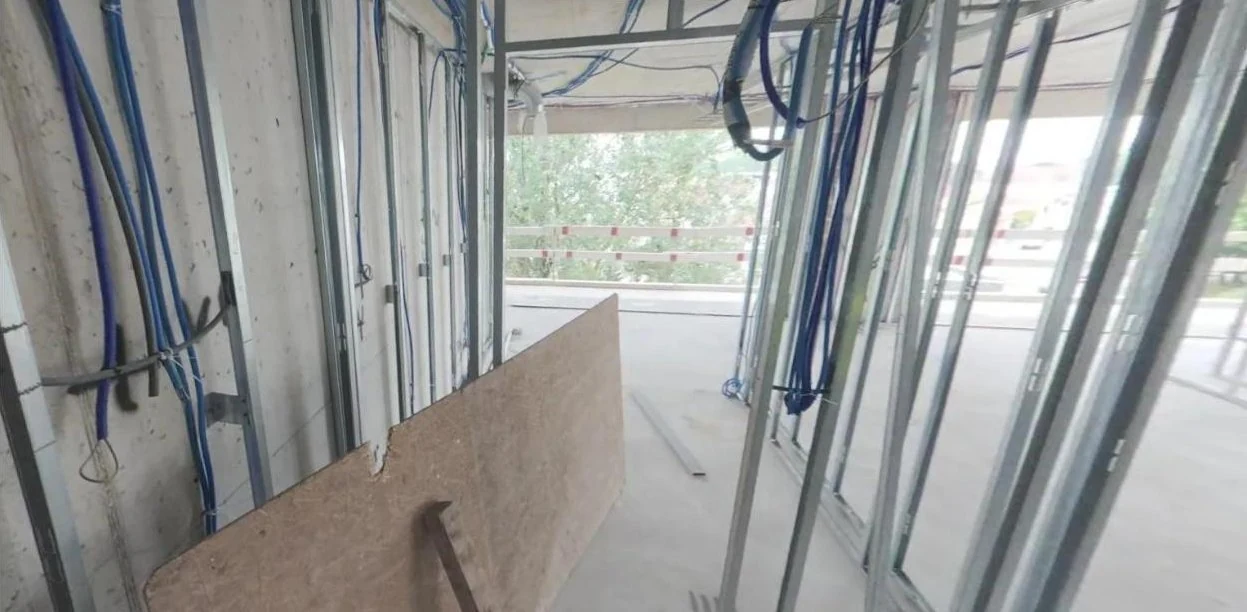
360° view of interior fit-out: stud framing with electrical cables before boarding

“Room 0.11 – cables in the stud framing still loose; secure before boarding.”

Ground-floor construction plan with room 0.11 highlighted
DefectLoose cables · Room 0.11Electrical trade · Photo from the walkthrough Completed · Reply via WhatsApp
WhatsApp · Electrical subcontractor
Plonda · taskSecure the cables in the stud framing in room 0.11 (ground floor) before boarding on Monday. Location and photo in the link.09:43 ✓✓
Done, cables secured.Fri 14:05

Site walk

Put on the camera. Start the walkthrough.

The walkthrough, voice notes and defects are automatically assigned to the right location.

Site access road in the 360° walkthrough with located entries
Site log with tasks and entries for drywall, tiling and flooring from a 360° site walk
One walkthrough, ten entries. What is said during the walk becomes an entry with trade, location and a direct jump to the recording. Both images come from actual pilot projects.

Cases

How it works on site.

From defect to subcontractor

Situation
Thursday walkthrough, 30 minutes, 14 open items.
Today
Notes and photos, an email per trade in the evening, chasing by phone.
With Plonda
Saying “The drywall partitions in the WC are still open” becomes a task with trade, assignee, due date, location and 360° evidence. It is sent to the subcontractor via WhatsApp.
Task “Close the open drywall in the WC” with trade, assignee, due date, location and photo

A disruption notice that holds up

Situation
The ground-floor CM test shows 2.8 % residual moisture – the screed is not ready for flooring, so your flooring contractor cannot start on Monday.
Today
A phone call, an email later – not enough in a dispute.
With Plonda
The delay is recorded with its date, justification and expected extension of the construction period; the site-log defect is attached as evidence. An internal checklist reminds you of the notification duty under § 6 Abs. 1 VOB/B. This provides the basis for the construction-sequence account required by the BGH.
Delay N-002 “Ground-floor screed not ready for flooring” with justification, construction period, linked defect as evidence and VOB/B checklist

Variation directly from the discovery

Situation
When the ceiling above the ground floor is exposed, six beam ends show rot – absent from the bill of quantities, with replacement required for structural reasons.
Today
The variation is prepared weeks later from phone photos and Excel; its justification has to be pieced together.
With Plonda
The discovery becomes a variation immediately: a new item with quantity and unit rate, photos and site-log entries as evidence, exported as GAEB X84.
Variation N-001 “Rotten beam ends above the ground floor” with item NP-01, 6 pcs × €271.00

The weekly report in five minutes

Situation
Friday afternoon, the client is waiting for the report.
Today
An hour in Word, looking up the weather, pasting photos.
With Plonda
The draft comes on Friday at 07:00 – from everything that was documented in the week, including weather. Check, correct, send as PDF or link.
Reports in Plonda: The draft for the week comes on Friday at 07:00, so far nine construction site notes and one task
Completed weekly report with summary and construction progress

The current plan on site

Situation
The architect sends a new drawing set; the foreman starts work tomorrow morning.
Today
Work follows whichever printout is hanging in the site cabin.
With Plonda
Upload a PDF: each page becomes a drawing with a number and revision. Tasks sit directly at their location on the drawing, and a new revision can be compared with the previous one.
Ground-floor layout in the plan viewer, revision C, with a task directly on the plan

The site on WhatsApp

Your foreman needs nothing but WhatsApp.

Send text, a photo, a voice message or a location. Plonda asks follow-up questions and creates structured entries – from Polish, Romanian or Turkish too.

Plonda · Demolition project
Strip-out on floors 1 to 4 is complete; we are still clearing up and sorting.27 Aug., 14:12 ✓✓
Thank you, this has been saved as a project entry.14:12
Entry in the Site Log · Source WhatsApp Strip-out on floors 1 to 4 completed Strip-out works on floors 1 to 4 completed; final clearing and sorting are ongoing.
Trade
Demolition
Status
Documented
Date
27.08.2026
Real entry from a pilot project, text of the message reproduced.
No private groupOne Plonda business number instead of groups with private phone numbers – cleaner for data protection.
MultilingualA voice message in Polish becomes a German entry in the right project.
Plonda asks follow-up questions“Where exactly?” – “Grid B/3, 2nd floor.” Only then is the entry created.

Over half of the planners and construction professionals use WhatsApp professionally, half send photos and videos (BauInfoConsult 2020).

In practice

Pierre Manthe
“A 30-minute walkthrough gives me a complete list of tasks, defects and documentation, sorted by trade. I can measure everything in 3D and refer to it at any time if there is a dispute.”

Pierre Manthe, Project Manager, campus Ingenieurgesellschaft mbH

Frequently asked questions

What site managers ask us first.

Does the subcontractor have to install an app?

No. They receive the task via WhatsApp or email with a link and reply through it, including photos or voice messages – without logging in.

What happens to people in the video?

People in the video are automatically made unrecognisable depending on your settings.

Does it replace our site diary?

It provides the content: dated entries with trade, location, weather and evidence, compiled weekly into a PDF report. Check in each case whether your contract requires a particular format.

Can I ask Plonda questions about the project?

Yes. In the project chat, ask for example “Which defects are open on the 2nd floor?” and receive the relevant entries with links.

See Plonda on your project.

Send us a walkthrough – we will show you the result on your own site.